Remote Install the software with Admin Right: runas /user:.\ localadmin "C:\ test \ cutewriter.exe " or runas /user:domainname\domainadmin "C:\test\cutewriter.exe" "C:\test\cutewriter.exe" is the exe file that is saved in the user laptop.
Posts
SFTP (CrushFTP serevr) renew Certificate
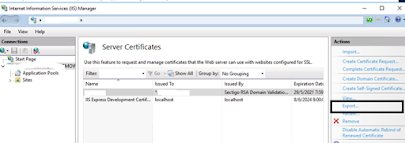
SFTP (CrushFTP serevr) renew Certificate 1. Use a certificate issued legitimately from CA (Sectigo) 2. Generate PFX file via IIS Manager Ensure the file type is *.pfx Password: star_photostriker 3. Copy file over to SFTP server 4. Convert PFX file to jks 5. keytool -importkeystore -srckeystore mypfxfile.pfx -srcstoretype pkcs12 -destkeystore identity.jks -deststoretype JKS 6. Login into CrushFTP web console 7. Go to navigate to Preferences, Encryption and open the SSL tab. Click on the Import Reply button 8. Input Keystore Path and Keystore Password 9. Click on the Browse button next to the Import Certificate Authority Reply File and upload the certific...
Useful VLAN Commands:
Adding a VLAN: Switch#configure terminal Switch(config)#vlan 2 Switch(config-vlan)#name Engineering Config VLAN on Access Port: Switch(config)#vlan 2 Switch(config-vlan)#name Engineering Switch(config-vlan)#exit Switch(config)#interface fa0/1 Switch(config-if)#switchport mode access Switch(config-if)#switchport access vlan 2 Switch(config-if)#end Configure Trunk Port: Switch(config)# vlan 5,7-9 Switch(config-vlan)exit Switch(config)#int fa0/1 Switch(config-if)#shutdown Switch(config-if)#switchport trunk encapsulation dot1q Switch(config-if)#switchport nonegotiate Switch(config-if)#switchport mode trunk Switch(config-if)#switchport trunk allowed vlan 3,5,8,99 Switch(config-if)#no shutdown Configure Native VLAN: Switch(config-if)#int fa0/11 Switch(config-if)#switchport mode trunk Switch(config-if)#switchport trunk native vlan 99 Verifying a trunk: 1) Switch# show interfaces fa0/11 switchport 2) Switch# show interfaces fa0/11 trunk Verify VLAN: Switch# show vlan id 2 Verify VLA...
VLAN Knowledge:

Virtual LAN (VLAN), Trunk and VTP 1) One VLAN is one broadcast domain. 2) Address Space ( Easy to summarization ). 3) Access port, Trunk port and Voice VLAN port. 4) Trunk can carry multiple VLAN frames. If you have only one switch, you don't need to use trunk link. 5) If you have multiple switches and VLANs, you can use trunk link by connecting Switch to Switch and Switch to Router. 6) Cisco Switch uses ISL ( inter switch link ) and IEEE uses 802.1Q. Now a day, cisco devices do not support the ISL. VLAN Membership: 1) Static VLAN ( Can add port into the VLAN by manually ). 2) Dynamic VLAN ( Can assign VLAN using VLAN membership policy server- VMPS server ). 3) Voice VLAN. Native VLAN and VLAN Ranges: - Cisco switch can use VLAN range ( 1-4094 ) - Normal Range is 1-1005 and Extended VLAN range 1006-4094. - VLAN 1 is the native VLAN. VLAN Trunking Protocol (VTP) - Older protocol of cisco device. - Can exchange information among the switches. - Three VTP modes are: Server mode...
ASA firewall HA
HA Network Design with ASA Firewall In this Lab, ISP1 will be Primary and ISP2 will be backup link. If ISP1 or R1 or SW4 down, ISP2 must take over the traffic. In this lab, - ASA Active/ Standby - HSRP, Track , IP SLA - VLAN, Trunk, EtherChannel, Inter-VLAN routing - OSPF and Static Route - NAT TRY ON: Task 1 ASA (Active and Standby) Configure ASA2 device to back up ASA1 firewall in the event of failure. Configure interface G0/0 as the Failover Link. This interface will be used to transit failover control messages. Assign a name of FAILOVERLINK and active IP address of 10.0.254.1/24 with a standby address of 10.0.254.1/24. Authenticate the failover control messages using a key of "AMS@CISCO". Configure host name of ASA1. Task 2 (HSRP on R1 and R2) Configure R1 as primary reliable gateway to reach the internet and R2 as secondary gateway for VLAN 10 and 11. Use Cisco proprietary protocol for gateway redundancy Set the he...
How to make Windows 7 bootable install USB stick
How to make Windows 7 bootable install USB stick Please note: during this procedure you'll lose any data on your USB flash drive. Please be extra careful during formatting, choosing the wrong drive will erase it completely. This guide provided as-is, at your own risk. You will need: PC running Windows XP/Vista/7/8 Windows 7, 32/64-bit (depending on the system) installation disk USB drive with at least 8GB of free storage Preparing the USB drive: Open command prompt as administrator - Right click on Start > All Programs > Accessories > Command Prompt and select Run as administrator or type cmd in the Start search bar. Run diskpart utility by typing diskpart into command prompt window and pressing “Enter”. Locate your USB drive disk number by executing list disk . We'll assume the USB drive is 1. Run the following commands: select disk 1 clean create partition primary select partition 1 active form...
ASA Fire Wall Cisco
Cisco ASA FireWall! - Adaptive Security Algorithm - Security Policy ( Allow or Deny traffics) - Check the state of each Packet - Session Management - 1) New Connection SYN packet - 2) Established Connection - 3) Control Plane Path ( advanced inspection) - Modes: 1) Routed and 2) Transparant 1) Security Level: (Incoming Traffic/Outgoing Traffic) 100=highest security 0= lowest security DMZ Outgoing Traffic= Highest Security to Lowest Security Incoming Traffic= Lowest Security to Highest Secur...