Posts

FortiGate Useful Command Line

FortiGate Useful Command Line: To check FortiGate Version: get system status To login to secondary firewall: Login to the Primary firewall CLI: type the following execute ha manage (follow the number 0 or 1 ) username FW01#execute ha manage 0 admin 0 is the ( firewall unit ID )- Secondary Firewall admin is the username. To check the checksum for HA FW01#diagnose sys ha checksum show

Dell EMC Firmware Upgrade N4064 Stack Switch with the USB flash drive

Image
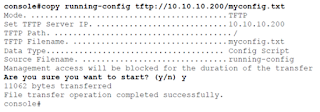
 1. Back up your configuration. The following commands copy the running-config to a USB drive or TFTP server. console#copy running-config tftp://10.10.10.200/myconfig.txt 2. Download the 6.5.4.18 firmware image from the support site below and save the extracted file into the USB Drive.  https://www.dell.com/support/home/en-sg/drivers/driversdetails?driverid=mrrwd&oscode=naa&productcode=networking-n4000-series 3. Download the 6.5.4.18 firmware image from the USB Drive and copy into backup. console#copy usb://N4000v6.5.4.18.stk backup console#show switch console#show version 4. Activate the 6.5.4.18 firmware console#boot system backup 5. Reload the switch console#reload Note that: connect the USB to the Master/Primary Switch  

Cisco 9200 Stack Switch Firmware Upgrade with USB flash drive

Image
 1. Download the new firmware from the following link. https://www.cisco.com/c/en/us/support/switches/catalyst-9200-r-series-switches/series.html#~tab-downloads 2. Copy the file cat9k_lite_iosxe.17.03.05.SPA.bin into the USB flash drive. 3. Connect the USB flash drive to the stack master switch and console it. 4. Before you do anything, backup all the configuration of the switches 5. Login to the stack master switch and check the mode using "Show Ver". In this case, it is running the install mode. 6. Remove unwanted Packages C9200#install remove inactive 7. Copy new image into the flash C9200#copy usbflash1:cat9k_lite_iosxe.17.03.05.SPA.bin flash: To verify: C9200#dir flash:*.bin  8. Set Boot Variable (Change Boot Mode from Bundle to Install Mode) C9200(config)#no boot system (For bundle mode) C9200(config)#boot system flash:packages.conf C9200(config)#end C9200#wr C9200#show boot system 9. Software Install Image to Flash C9200#install add file flash:cat9k_lite_iosxe.17.03.0...
Image
Reset the Cisco Switch Password: Seven Steps for CISCO switch password reset 1. Enter ROMMON mode 2. Rename the config.text file 3. Reboot the switch 4. Rename the config file back to original name 5. Copy current config into running_config 6. Update the new password and secret 7. Save the configuration and restart 1. Enter the ROMMON Mode: Connect the power cable and console cable. Then press and hold the mode button and switch on the power. It will bring to Rommon Mode. When you see the flash mode: then remove the mode button from the switch switch: more flash:config.text then copy and save the backup config file. After that do the following steps Switch: dir flash: 2. Rename the config      Switch: rename flash:config.text flash:config.old    To Verify:      Switch: dir flash: 3. Reboot the switch     Switch: boot 4. Rename the config back to Original      Switch#dir flash:     Switch#rename flash:config.o...
 Remote Install the software with Admin Right: runas /user:.\ localadmin "C:\ test \ cutewriter.exe " or   runas /user:domainname\domainadmin "C:\test\cutewriter.exe"  "C:\test\cutewriter.exe"  is the exe file that is saved in the user laptop.  

SFTP (CrushFTP serevr) renew Certificate

Image
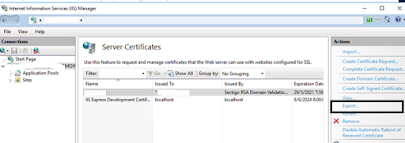
  SFTP (CrushFTP serevr) renew Certificate 1.        Use a certificate issued legitimately from CA (Sectigo) 2.        Generate PFX file via IIS  Manager Ensure the file type is *.pfx Password: star_photostriker 3.        Copy file over to SFTP server 4.        Convert PFX file to jks 5.     keytool -importkeystore -srckeystore mypfxfile.pfx -srcstoretype pkcs12 -destkeystore identity.jks -deststoretype JKS    6.   Login into CrushFTP web console 7.      Go to navigate to Preferences, Encryption and open the SSL tab. Click on the Import Reply button   8.        Input Keystore Path and Keystore Password   9.        Click on the Browse button next to the Import Certificate Authority Reply File and upload the certific...

Useful VLAN Commands:

 Adding a VLAN: Switch#configure terminal Switch(config)#vlan 2 Switch(config-vlan)#name Engineering Config VLAN on Access Port: Switch(config)#vlan 2 Switch(config-vlan)#name Engineering Switch(config-vlan)#exit Switch(config)#interface fa0/1 Switch(config-if)#switchport mode access Switch(config-if)#switchport access vlan 2 Switch(config-if)#end Configure Trunk Port: Switch(config)# vlan 5,7-9 Switch(config-vlan)exit Switch(config)#int fa0/1 Switch(config-if)#shutdown Switch(config-if)#switchport trunk encapsulation dot1q Switch(config-if)#switchport nonegotiate Switch(config-if)#switchport mode trunk Switch(config-if)#switchport trunk allowed vlan 3,5,8,99 Switch(config-if)#no shutdown Configure Native VLAN: Switch(config-if)#int fa0/11 Switch(config-if)#switchport mode trunk Switch(config-if)#switchport trunk native vlan 99 Verifying a trunk:  1) Switch# show interfaces fa0/11 switchport 2) Switch# show interfaces fa0/11 trunk Verify VLAN: Switch# show vlan id 2 Verify VLA...